 Skip to content
8 Tips For Selling Your Old Laptop
In this article
A time may inevitably come when you might want to upgrade your laptop because it won’t be able to meet all of your needs.
Most people consider selling their old laptop and putting the proceeds toward a new one before throwing it out.
But be warned, it’s not as easy as you might think to sell a used laptop. Preparing the old hardware is necessary to avoid giving your personal information to a stranger!
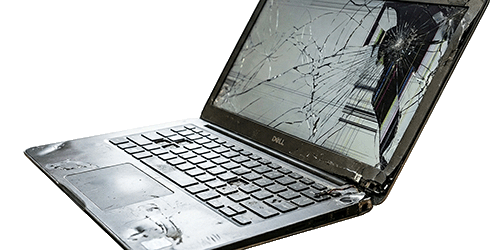
If you’re thinking, “I want to sale my laptop for cash,” these tips will guide you through the process. We will discuss the best tips for selling your faulty laptop, protecting your private data, and getting the best price.

Back-Up Your Files
Making sure your data is not shared is the top priority, but making sure you still have your data is just as important.
So ensure you protect your vital files before erasing the data from your laptop.
Determine what data is important and move it to an external drive within Windows.
If you have a Macbook, you may use their built-in cloud storage services for backup.
Ensure you have a complete backup of your system – often it is best to copy more than you might need – at least you will not lose your data!
Although several third-party options are available, Windows 10 still has a built-in function that lets you make a system image backup of your installation, preferences, applications, and files.
Simply click on the Start button and type “Windows Backup” and follow the on-screen prompts.
Perform a Factory Reset
Next step is to perform a factory reset of your laptop. This will guarantee that the data on the laptop will deleted and Windows is returned to its initial factory settings.
Windows Reset This PC
Click on the Start button and type “reset”. This will bring up the built in Windows Reset Tool.
Simply follow the onscreen prompts, but be sure to tick the “Wipe the Drive” option.
This option erases all data from the internal hard drive before re-loading Windows.
Advertisment
Remove the Internal Hard Drive
If you are selling a faulty laptop and it no longer powers on, one option is to remove the internal hard drive which contains your data.
This process differs from laptop to laptop, and remember you will receive less for your faulty laptop as you have removed the drive – but at least your data is safe!
Data not deleting
Sometimes, the Windows Reset tool fails, this can happen on older model laptops.
If you run into this problem, extra steps like data wiping or using specialist software may be required before selling or discarding the laptop to guarantee total data deletion.
Check if Any Component Needs a Replacement
Smoothly operating, high-performing computers are not only easy to sell, but they also fetch a premium price. Thus, before you put your Windows PC up for sale, ensure none of the parts need to be changed.
If this isn’t done in advance, the buyer might discover that the RAM, hard drive, or other comparable component is due to fail. This might lead him to break the transaction, making you look even more foolish.
As a seller, you can do the tests to ensure nothing has to be replaced. We have a comprehensive tutorial on the tests you should run on a secondhand PC before purchasing it.
Clean Your Laptop Properly
Take a moment to clean your old laptop before you sell it, as no one wants to pay top money for gadgets that appear used. One small amount of isopropyl alcohol can go a long way.
Remove any stickers from the device and use alcohol to wipe any remaining residue. While cutting off stickers with a knife may be tempting, try doing it with your hands first to avoid scratching the surface.
Once that’s finished, tidy up the little details, like the creases and buttons. You might want to take a moment to clean the keyboard on laptops. Most people who purchase broken electronics will pay extra for aesthetically pleasing devices.
It doesn’t matter how powerful your computer hardware is if it looks bad. Selling a plain PC or laptop would be difficult, and you would need to put in a lot more effort to gain the buyer’s confidence.
Pick the Right Marketplace
You should feel confident giving the laptop you used to its new owner if you follow the above instructions.
Additionally, selecting the appropriate market for your laptop sale is just as crucial as improving its look in terms of your possibilities of obtaining a better price.
To ensure you receive the greatest deal, the marketplace must provide a safe way to list and sell your goods. One of the best options is to sell your laptop on eBay, but before you do, check other listings on eBay to determine what price to ask.
Here at Console Therapy, we also buy faulty laptops and offer a hassle-free way to sell your faulty laptop.
We also arrange free collection from anywhere in the UK!
The process is quick and safe because sellers get paid immediately using the method they choose after the laptop is inspected.
Take Good Quality Pictures
You should post high-quality photos if you’re selling your used laptop on an online marketplace such as Facebook Marketplace, or eBay.
Although it may be the step in the selling process you hate the most, it’s also the most crucial. Customers are more likely to spend a good amount on a professionally listed product since they look at photographs before reading descriptions.
Your phone will be enough to capture good photos; you don’t need an expensive camera. Simply aim to capture images on a spotless, well-lit surface.
Buyers must see what they’re buying; a few extra pictures will go along way.
Find Your Laptop Specifications
It sounds simple, but you may sell your laptop for more money if you know more about it.
Customers are more likely to be interested in purchasing the laptop if you can explain all its specifications to them.
A laptop’s screen size and touchscreen support, as well as its CPU, memory, hard drive, and graphics capabilities, are important considerations.
Many people use laptops for gaming and watching movies or videos, so their focus is mainly on these aspects.
The easiest place to search for a laptop’s spec is by entering the model number on the manufacturer’s website. Among all the little writing in that region is the model number.
Another way is to simply right-click the Start menu icon, select System from the list of options, and you can find the processor and installed RAM or memory under Device Specifications.
To see the size of your hard disk, click Storage on the window’s left side.
Give a Concise Description
Writing an essay for your product is not necessary. But, a succinct, well-organized description is ideal.
Keep in mind that consumers should spend their time purchasing rather than contemplating.
Generally speaking, you should include the model number, storage capacity, and processor type.
Try to include the entire model number for laptops, typically located on the bottom of the device, along with specifications like RAM, internal storage, and processor power.
Make sure to point out any imperfections, even purely aesthetic. Also, mention any accessories the gadget may have, such as charging cables.

Advertisment
Message from our sponsors
What our customers say


Further reading

How to Fix the BLOD on PS5
How to fix the BLOD on PS5 In this article PlayStation 5 has gained popularity

Install Xbox One OS On New Hard Drive – 2025 Guide
Install Xbox One OS on new hard drive – 2025 Guide In this article The

Xbox One offline update
How to perform an Xbox One offline update In this article Where would games consoles

Can you sell a faulty PS5
Can you sell a faulty PS5? In this article Is you PlayStation 5 faulty? Have

Xbox One X Error E102 and how to fix it
Xbox One X Error E102 and how to fix it In this article Xbox One
Get in touch