...

How to make Xbox One run smoother - speed up your gaming

How to make Xbox One run smoother

In this article

So, you are getting into your gaming, which means you want to take things seriously. And the last thing you need is a console that is not running smooth or fast and is holding you back.

A smooth running Xbox One will not only help you to enjoy your gaming experience, but will also help your gaming performance too!

How to make Xbox One run smoother

Steps to take to help your Xbox One run smoother

There are numerous reasons why your Xbox may start to become sluggish and not run as smooth as it was when you first cracked open that brand new box fresh from the store. 

In this article we share the best ways to make your Xbox One run smoother.   We recently posted an article on why your Xbox might run slow,  be sure to read our article here.

So, let’s take a look at the most common and best ways to make your Xbox One run smoother with some quick and easy tips and tricks.

Cache, money?

One of the best ways to get your Xbox One running smoothly is to clear the cache on your Xbox One. The cache on your Xbox One, similar to your PC, is used to store data to allow you to access it quickly and easily.

Whilst that of course is very useful, it can also become bogged down from the growing amount of data that it is holding if you do not clear it out on a regular basis. Clearing the cache can of course help you to make your Xbox One run smoother,

The frustrating thing with the cache on the Xbox One is that you won’t find it on a simple menu like you would on your computer. You have to get quite physical:

  • Start off by turning your Xbox off with the power button on your console. Once it has fully shut down, remove the power cord from the back of the console; not just from the wall plug. It MUST be disconnected from the Xbox One.
  • Keep the plug out for around a minute, and then reconnect the power cable.
  • Let another minute go by, and then proceed to turning the console back on. This should have cleared the cache and should allow your Xbox One to run much smoother.

Be sure to do this fairly regularly to ensure your cache is never storing unwanted or unneeded data!

Pretty Menu

Another useful hint and tip to help you smooth out your Xbox One performance is to turn off smooth transitions on your dashboard!

To do so, all you need to do is go to your settings, and themes, and turn it off! Let’s face it; does it really matter if menu changes and button clicks seem a bit lumpy?

Advertisment

Hot Dust

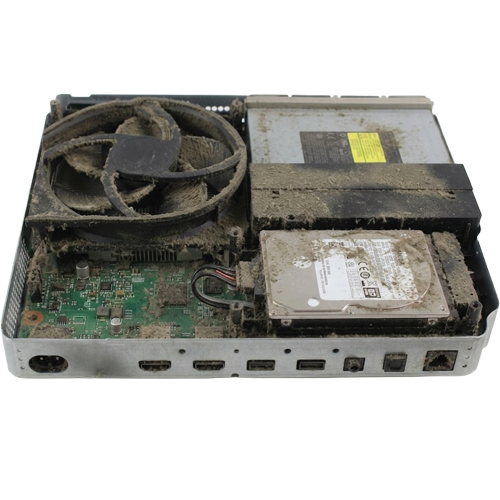
By far the biggest and easiest results to help make your Xbox One run smoother  is too help ventilation. 

The Xbox One runs hot so we need to make sure it is well ventilated – the top AND sides of your favorite console should not be covered – if you have your Xbox One tucked away in a stylish cabinet, make sure you keep the doors open during game play. 

Excessive heat can massively reduce performance as you are making the Xbox One work even harder to render graphics and process data. 

A good tip is to regularly blow out any dust from the fan and vents around the Xbox One – dust (even if you live in the most cleanest house) will naturally gather in the vents, so disconnect all cables, take a can of compressed air and blow it into the vents around the Xbox to give it a way of breathing clearer. 

Thermal Cleaning

Talking of heat, our next tips is for our more adventurous readers.   Inside your Xbox One is a processor which created a LOT of heat.  To help cool down the processor is a metal block and fan called a heatsink.  To make sure there is a good bond between the  processor and heatsink is a product called thermal paste (also called thermal compound) – this makes sure the heat created from the processor transfers efficiently to the heatsink. 

Thermal paste can breakdown after a few years, making it less efficient and in turn, the processor heat does not transfer as well to the processor. 

It is a good idea to replace the thermal paste, especially if you feel the Xbox One getting warmer than it has in the past.

It is straight forward to replace the thermal paste but it does mean opening your Xbox One, and removing the heatsink so should only be attempted if you are confident with a screw driver. 

Console shutting down

Now our final tip and hint in this article is to ensure that any apps or games you aren’t using are closed down properly.

Once again, similar to your computer, the more apps and programs you have open the slower your Xbox One console will be – so if you want to ensure your Xbox one runs smoothly consider shutting down everything that you don’t need.

simon console therapy
Guide written by Simon Arthur

Senior Technician and Chief Writer here at Console Therapy

With over 30 years of experience in IT hardware repairs and Electronics, Simon has a personal, non-jargon approach to home electronic repairs.

Advertisment

Message from our sponsors

What our customers say

Further reading

Get in touch